I rebuilt a security platform 3 times. None of the rebuilds were about AI.
Everyone assumes the AI orchestration was the hard part of building a security scanning platform.
It was not.
The CrewAI pipeline (that is, multi-agent vulnerability assessment and remediation research) worked relatively quickly. Two stages, structured output, Fargate tasks. Straightforward.
The part that required three full rebuilds was everything above the AI layer: getting network scanners into hardened client networks, making the results flow reliably back to our platform, and making the whole thing usable by MSP operators who have never touched a terminal.
The system
The platform had three scanner types:
Network scanner: an on-demand EC2 instance in an isolated subnet running OpenVAS and Nmap. Connected to client networks via WireGuard VPN tunneled over WebSocket.
Endpoint agent: a lightweight .NET exe deployed to client machines via their RMM tool. Collected system telemetry and ran local Nmap scans.
Cloud scanner: a Fargate task given customer cloud credentials to audit Microsoft tenant configurations using Prowler, ScoutSuite, and SCUBA.
All three fed scan data through the same ingestion path: API Gateway, SQS, Lambda consumers in parallel, PostgreSQL. Dead-letter queues handled failures.
From there, a two-stage CrewAI pipeline ran on Fargate. Stage one performed a full vulnerability assessment across all collected data. Stage two did deep research per vulnerability and generated prioritized remediation steps with time estimates. The Next.js portal orchestrated everything and assembled the final report.
Architecture diagram (click to expand)
Architecture diagram (click to collapse)
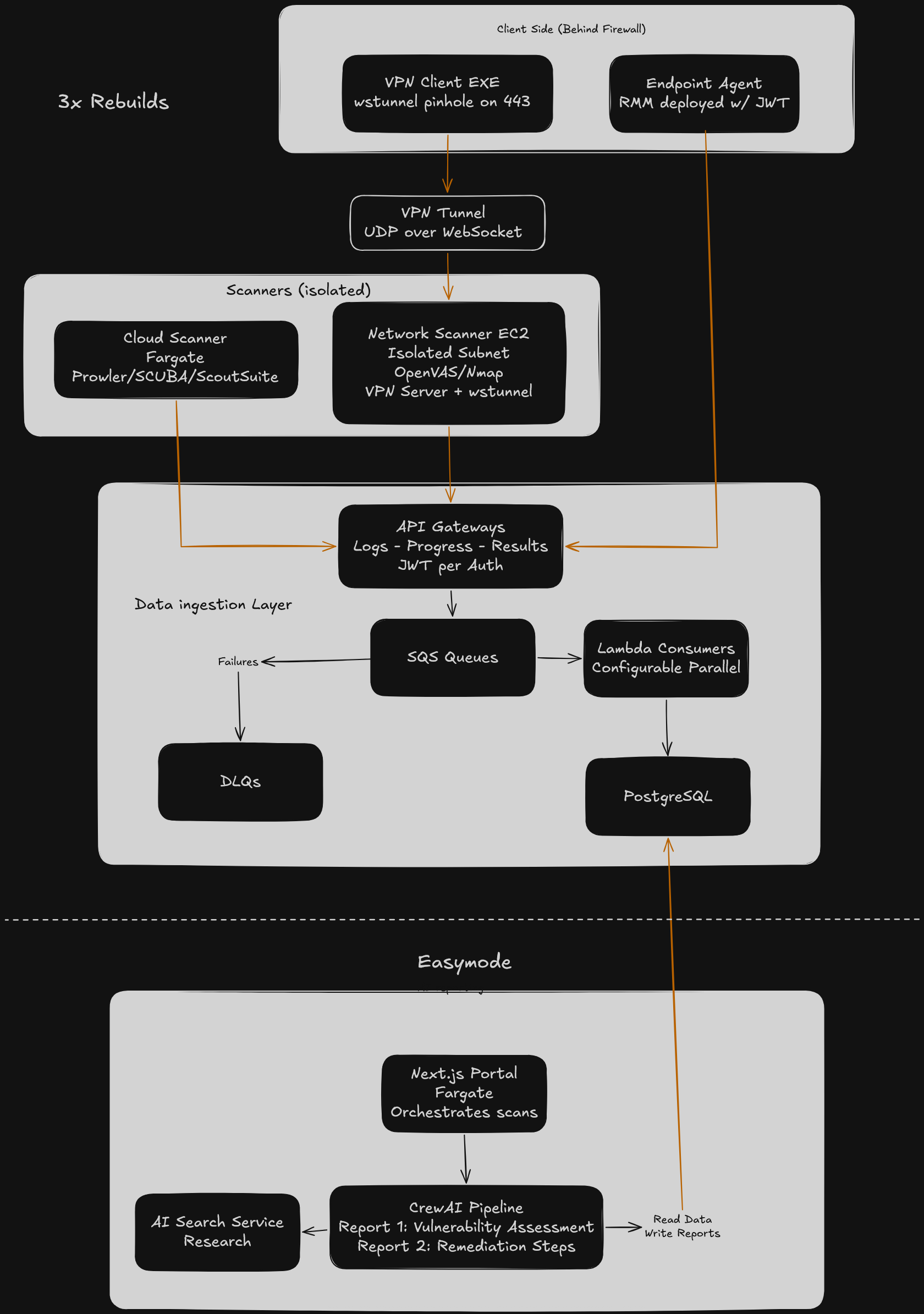
The AI reporting layer was the simplest part of the architecture. The diagram makes that obvious; everything above the database is where the complexity lived.
Why this was hard
Network scanning sounds simple until you try to make it work for someone who is not a network engineer.
MSP operators manage IT for small businesses. We were asking them to initiate vulnerability scans across their clients’ networks. That involves VPN tunneling through firewalls, scanner configuration, endpoint deployment through RMM tools, and interpreting raw scan output. None of which a typical MSP operator should need to understand.
On top of that, there were local executables that needed to be downloaded and distributed to client machines. We needed to get through security measures without asking users to turn off their defenses. There was orchestration timing to manage, different RMM technologies for distributing agents, and installation prevention software that needed exceptions.
We could not design our way through this from a whiteboard. We needed to iterate against real user constraints.
The four iterations
V1: I assumed AI could carry me through unfamiliar territory
V1 was built in early 2025 when AI development tooling was just getting popular. I was tasked with evaluating these tools and standardizing them for the rest of the company.
For the first couple of months, I leaned too heavily on AI to generate code in a domain I did not understand. I did not have the networking and security expertise to make informed architecture decisions. The AI was confidently producing output I could not evaluate.
I got a working prototype together, but it was not going to scale. I had a demo I could not debug. When something broke, I did not know enough about the scanning stack to figure out why, so every fix was a guess. The architecture was shaky because my understanding of the underlying systems was shaky.
V2: I assumed a better tech stack and deeper knowledge would solve the deployment problem
I stepped back and used AI to accelerate learning instead of skipping it. I built many small prototypes — harness projects for individual pieces of the system — until I understood the full picture before integrating anything.
I also switched the tech stack from Express with a Node backend to NextJS all the way through. AI struggled heavily on data boundaries. Having a distinct internal REST API made it constantly hallucinate and mismatch data models between the backend and frontend. NextJS let me use the same Prisma model definitions through the full pipeline, which made development faster and more reliable.
With the stack solid, the real question became: how do you get a network scanner into a client’s hardened network?
OpenVAS only runs on Linux. It needs a massive Docker orchestration environment. Nmap needs to be on the same network as the targets. The simplest option was building a small Linux box and shipping it to each client, but that would not scale and still left network security problems unsolved.
So I built a cloud-based scanner instead. An EC2 instance would act as a VPN client, and the MSP would create a VPN user for it and send over a config file. The EC2 would connect through the tunnel and begin scanning.
In theory, MSP customers always have a VPN server on premises. In practice, they do not. There are too many flavors of VPN server, and most MSPs could not configure it correctly even if they wanted to. This approach died as soon as we talked to actual MSPs about what they would need to do on their end.
V3: I assumed I could reuse a machine already on the client network
With the cloud VPN approach dead, I tried to avoid the networking problem entirely by running scanners on a machine already inside the network.
The problem: clients almost exclusively have Windows machines. The solution: Windows Subsystem for Linux. I built a custom WSL Ubuntu image pre-configured with all scanning services. The client would run our Windows exe, which set up WSL, downloaded the images, and started scanning.
It worked. I got detailed scan results on practice networks.
But WSL is not non-intrusive. It needs Hyper-V enabled, which is routinely turned off for security reasons and requires a reboot to configure. It also needed 16 GB of RAM since WSL plus OpenVAS consumed 8 just to start. We were still relying too much on the client to make the system work.
V4: I assumed we needed to flip the VPN model
We connected with a field expert on security scanning who had solved a similar problem a decade earlier working as an MSP.
His suggestion: the same VPN solution we tried in V2, but reversed. Make the EC2 instance the VPN server instead of the client.
That was the hybrid approach we needed. An EC2 scanner in the cloud with all orchestration on our hardware, and a lightweight downloadable client that installed WireGuard and connected to the server. We tunneled the VPN traffic over WebSocket using wstunnel on port 443 to get through firewall filtering that would block standard VPN protocols.
The client-side footprint was minimal: a small exe, no configuration beyond running it, no server-side VPN setup required from the MSP. The scanning infrastructure lived entirely in our AWS account in an isolated subnet.
This was the version that made it to production.
What I got wrong
The iterations themselves were not the mistake. Iterating on a hard UX problem is how product development works.
The actual mistakes would have compressed ten months of iteration down to about four.
First, I did not spend the time to learn the subject matter before building. V1 cost me roughly two months of building on a foundation I did not understand. I should have used AI to accelerate my learning from the start and built small prototypes for each piece of the system instead of trying to assemble the whole thing at once.
Second, I did not bring in real users early enough. The V2 VPN-client approach took weeks to build and died in a 30-minute conversation with an actual MSP. V3’s WSL approach had the same outcome. Any MSP would have flagged the Hyper-V and RAM requirements as non-starters immediately if we had asked before building.
The pattern is simple: validate the riskiest assumption with the cheapest possible test before building the infrastructure around it.
When to do something different
The complexity in this project came from building for non-technical operators. If your users are developers or DevOps engineers, you can skip most of the UX iteration that ate my time. A technical user will configure a VPN client, SSH into a scanner, and interpret raw output without a polished portal guiding them through it.
If you have a team and a designer, you can also parallelize the UX work with the infrastructure work. I was doing both sequentially as a solo CTO, which meant every UX dead end also stalled the infrastructure progress. A team could have been building the ingestion pipeline and CrewAI orchestration while I iterated on the deployment model with a designer.
And if you are building any product that touches client networks or client machines, talk to your users before you build the deployment model. The networking constraints are almost never what you assume they are from the outside.
What’s next
Next up: why free-text handoffs between AI agents kill your pipeline, and what to use instead.
If you want that when it goes live, sign up below for alerts.